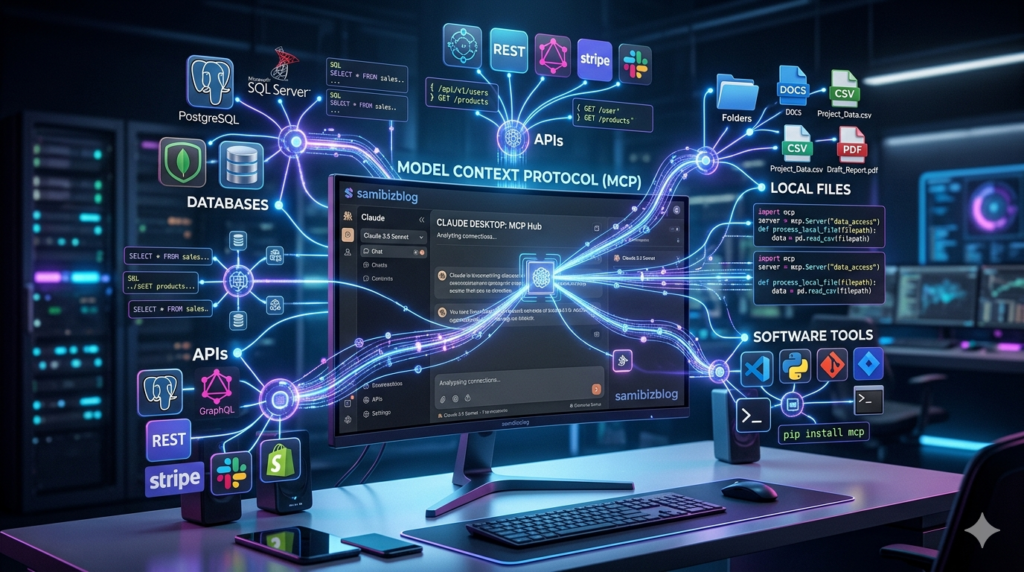
Artificial intelligence is becoming more powerful every day. However, AI becomes truly useful when it can interact with real-world tools like databases, APIs, business software, and local files.
For years, developers had to build custom integrations every time they wanted an AI model to communicate with external systems. Connecting an AI assistant to a CRM, database, or internal application required writing separate code for every tool.
That’s where Model Context Protocol (MCP) changes everything.
Many developers now describe MCP as the “USB-C for AI applications” because it provides a universal way for AI systems to communicate with external tools and data sources.
If you’re searching for an MCP Server Setup Guide, a Claude MCP Setup tutorial, or want to learn how to Build an MCP Server, this complete guide will walk you through everything step by step.
- What Is Model Context Protocol (MCP)?
- Why Anthropic Created MCP
- Understanding MCP Architecture
- The Three Core Components of MCP
- Understanding MCP Resources and Tools
- Prerequisites Before Building an MCP Server
- How to Build a Custom MCP Server with Python
- FastMCP Tutorial for Beginners
- The Golden Rule of MCP Debugging
- Claude MCP Setup Guide
- Testing Your MCP Server
- Common MCP Troubleshooting Tips
- Real-World AI Tool Integration Examples
- Frequently Asked Questions
- Final Thoughts
What Is Model Context Protocol (MCP)?
Model Context Protocol (MCP) is an open standard developed by Anthropic that allows AI applications to securely connect with external tools, APIs, databases, and local resources.
Official documentation:
https://modelcontextprotocol.io
Think about how your web browser can open millions of websites because every website follows standard internet protocols.
MCP brings the same idea to artificial intelligence.
Instead of creating separate integrations for every application, developers can build one standardized connection that works with multiple systems.
In simple terms, MCP acts as a translator between AI and software tools.
Without MCP:
- More development time
- More maintenance
- More complexity
- Higher integration costs
With MCP:
- Faster development
- Easier automation
- Better scalability
- Secure communication between systems
Internal Link: Complete Claude AI Beginner Guide
Why Anthropic Created MCP
Before Anthropic MCP, connecting AI models to external systems was messy and expensive.
Imagine a company using:
- Customer relationship software
- Internal databases
- Marketing dashboards
- Customer support platforms
- Development repositories
Every integration required custom code.
Anthropic introduced MCP to create a universal communication framework that allows developers to build once and connect everywhere.
Official Claude Website:
https://www.anthropic.com/claude
Benefits include:
✅ Reduced development costs
✅ Easier maintenance
✅ Improved security
✅ Better scalability
✅ Faster innovation
Understanding MCP Architecture
The easiest way to understand MCP Architecture is through a restaurant analogy.
| Component | Real-Life Example |
|---|---|
| Host | Customer |
| Protocol | Language |
| Server | Waiter |
| External Tools | Kitchen |
Every component has a specific responsibility.
The Three Core Components of MCP
1. The Host
Examples:
- Claude Desktop
- Claude Code
- Future MCP-compatible applications
2. The Protocol
The protocol uses:
- JSON
- JSON-RPC
- Standard Input/Output
3. The Server
The MCP Server controls:
- What information AI can access
- Which tools can be executed
- How requests are processed
- What responses are returned
Understanding MCP Resources and Tools
Resources
Resources provide information:
- Documentation
- Database schemas
- Configuration files
- Log files
Tools
Tools perform actions:
- Querying databases
- Calling APIs
- Sending notifications
- Running scripts
- Fetching live information
This is where the true power of AI Tool Integration begins.
Prerequisites Before Building an MCP Server
Before starting this MCP Server Tutorial, install:
Claude Desktop
https://www.anthropic.com/claude
Python 3.10+
Verify installation:
python --version
UV Package Manager
Install:
curl -LsSf https://astral.sh/uv/install.sh | sh
How to Build a Custom MCP Server with Python
Create your project:
uv init custom-mcp-server
cd custom-mcp-server
uv venv
source .venv/bin/activate
Windows:
.venv\Scripts\activate
Install dependencies:
uv add "mcp[cli]" httpx
Create:
touch server.py
FastMCP Tutorial for Beginners
Import libraries:
import sys
from mcp.server.fastmcp import FastMCP
import httpx
Initialize:
mcp = FastMCP("QuickStart-Server")
FastMCP dramatically reduces the amount of code needed for MCP Server Development.
The Golden Rule of MCP Debugging
Wrong:
print("Debug")
Correct:
print("Debug", file=sys.stderr)
Never print debugging information to stdout.
Claude MCP Setup Guide
Open:
Settings → Developer → Edit Config
Add:
{
  "mcpServers": {
    "crypto-tracker": {
      "command": "uv",
      "args": [
        "run",
        "--with",
        "mcp[cli]",
        "--with",
        "httpx",
        "/ABSOLUTE/PATH/TO/YOUR/server.py"
      ]
    }
  }
}
Save and restart Claude Desktop.
Testing Your MCP Server
Look for the hammer icon.
Try:
What is the current price of Ethereum?
Claude should automatically call your MCP tool and return live results.
Common MCP Troubleshooting Tips
Missing Hammer Icon
Check JSON formatting.
Server Not Starting
Use absolute paths.
Tool Crashes
Install missing dependencies.
Protocol Errors
Never print to stdout.
Real-World AI Tool Integration Examples
- Customer Support Automation
- Internal Databases
- Software Development
- Marketing Automation
- SaaS Applications
- Development Repositories
Frequently Asked Questions
What is an MCP Server?
An MCP Server acts as a bridge between AI and external tools.
Is MCP only for Claude?
No. It’s an open standard.
Can I build an MCP Server with Python?
Yes.
What is FastMCP?
A framework that simplifies MCP development.
Can MCP access databases?
Yes.
Is MCP secure?
Yes.
Why is MCP important?
Because it standardizes AI integrations.
Can businesses use MCP internally?
Absolutely.
Final Thoughts
Model Context Protocol (MCP) represents a major step forward in AI integration.
Instead of building endless custom connections, developers can create standardized systems that work across multiple tools and applications.
Whether you’re interested in Claude Desktop MCP, AI Tool Integration, or building your own Custom MCP Server, learning MCP today is an investment in the future of artificial intelligence.
The future won’t belong to people who simply use AI chatbots.
It will belong to those who know how to connect AI with real-world systems.
And Model Context Protocol is one of the most important skills to learn on that journey.
Continue Your Claude AI Journey
Now that you’ve learned how to build a Claude MCP Server, your next step is mastering Claude itself. If you haven’t already, check out our Complete Claude AI Beginner Guide to learn how Claude works, explore its best features, and discover practical ways to use AI for business, content creation, and automation. Together, these guides will help you build a strong foundation in modern AI tools and workflows.